
Choose an ERP that improves inventory, production, & cash flow
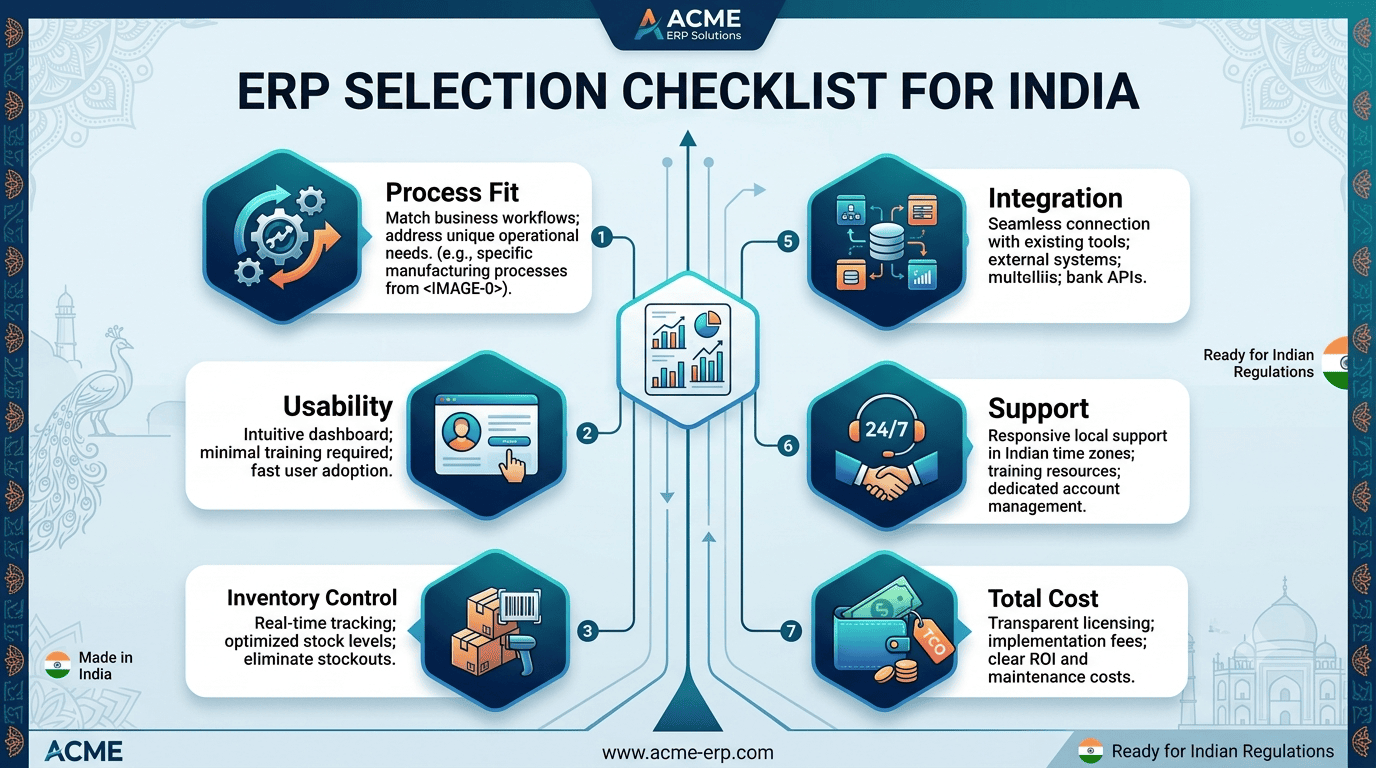
The Checklist That Saves Crores
Most manufacturing MSMEs don’t fail because they don’t work hard. They fail because the business outgrows the system running it. One day you’re tracking inventory on Excel, production on WhatsApp, and dispatch on gut feel. The next day, a single missed raw material update delays a customer shipment, and suddenly the “software problem” has become a cash-flow problem.
That’s why choosing an ERP is not a software purchase. It’s a business decision that can shape profitability, delivery performance, working capital, and even customer trust.
The real ERP mistake
A lot of MSME founders choose ERP the same way they choose a vendor for office chairs: compare features, look at price, pick the most “complete” option. That is usually where the trouble begins.
Because an ERP for a manufacturing company is not about how many buttons it has. It is about whether it can handle your shop floor reality: job work, BOM changes, rejections, rework, subcontracting, batches, RM-to-FG traceability, and the constant drama between sales promises and production capacity.
If the ERP does not fit the way your factory actually runs, people will bypass it. And the moment that happens, you are back to spreadsheets, only now they are expensive spreadsheets.
Start with process fit
Before comparing software, map your core processes. Ask these questions:
- How do orders come in?
- How is the BOM created and changed?
- Do you manufacture make-to-order, make-to-stock, or both?
- Do you send operations to job workers?
- Do you need batch or serial traceability?
- How do you handle quality checks, scrap, and rework?
- What reports do owners and managers actually need daily?
A small auto-component unit, a food processor, and a textile job shop may all be “manufacturing MSMEs,” but their ERP needs are wildly different. A chemical manufacturer may need batch traceability and expiry tracking, while a precision parts manufacturer may care more about routing, WIP visibility, and machine-wise production. The best ERP is not the most famous one; it is the one that mirrors your operating model.
Choose for your complexity
A common trap is buying an ERP for the company you want to become in five years, not the company you run today. That sounds ambitious. It is also risky.
If you are a 40-person factory with one plant, 200 SKUs, and limited IT support, a heavyweight ERP can become a burden. You may spend months configuring it, training people, and fixing adoption issues. In many MSMEs, the first ROI test is simple: can the shop floor use it without constant handholding?
On the other hand, do not underbuy just to save license cost. If your business already has:
- multiple production stages,
- subcontracting,
- frequent RM price changes,
- batch traceability needs,
- and customer-specific approvals,
then a bare-bones system will not age well. The right question is not “Which ERP is cheapest?” It is “Which ERP can handle our current mess and still scale without breaking our team?”
Look at shop-floor usability
An ERP can be technically powerful and still fail in a factory because people hate using it.
Shop-floor teams are busy. Supervisors are moving between machines, materials, people, and problems. If data entry takes too long, the system will not survive the first production rush.
So evaluate:
- Can operators or supervisors enter data quickly?
- Can it work on mobile or tablets if needed?
- Are screens simple enough for non-finance users?
- Can production confirmations be done in a few clicks?
- Can the system handle Indian factory realities like power cuts, network issues, and shared devices?
For example, a cement bag manufacturer may not need a fancy dashboard on day one. It may need fast entry of dispatches, weighment data, and stock movement. If the interface is cluttered, adoption will collapse. In manufacturing, usability is not a nice-to-have. It is the difference between data and fiction.
Prioritize inventory control
For most MSMEs, inventory is where money quietly disappears. Too much stock ties up cash. Too little stock stops production. Wrong stock creates quality issues. And if your raw material, WIP, and finished goods numbers do not match reality, the ERP becomes a guessing machine.
A strong ERP should help you with:
- raw material consumption tracking,
- WIP visibility,
- finished goods stock,
- rejected material tracking,
- non-moving inventory,
- and warehouse location control.
Example: a plastic moulding company may carry multiple resin grades and colorants. If the ERP cannot track exact consumption and batch usage, the company will either overbuy or face quality variation. Similarly, a pharmaceutical or food MSME cannot afford weak batch tracking because compliance and recall risk are too high. If inventory is your biggest leak, then ERP selection should start there, not in the accounting module.
Demand better reporting
Many founders ask for “reports,” but what they really need is decision visibility. A useful ERP should tell you, at a glance:
- what orders are delayed,
- which machines or lines are underutilized,
- which materials are short,
- where WIP is stuck,
- which jobs are losing margin,
- and how much cash is blocked in stock.
The report should not be a beautiful PDF nobody reads. It should help you take action before the problem becomes expensive. For instance, if a fabrication unit can see that one order is consuming extra rework hours, it can intervene early. If a packaging MSME can see purchase delays against production plans, it can avoid dispatch penalties. Good reporting is not about data volume. It is about speed of response.
Check integration, not just features
An ERP rarely works alone. It should connect with:
- accounting,
- barcode or QR systems,
- weighbridge software,
- GST workflows,
- e-invoicing,
- payroll if needed,
- and sometimes CRM or quality systems.
This matters because disconnected systems create duplicate work. Someone enters the same data twice, makes mistakes, and eventually stops trusting the software. A small engineering company, for example, may need its ERP linked to dispatch documentation and invoicing. A food manufacturer may need integration with quality checks and batch expiry. If integrations are weak, you will pay for software and then pay again for manual cleanup.
Ask one simple question before buying: what will still be done in Excel after this ERP goes live? If the answer is “too much,” the integration story is not strong enough.
Evaluate vendor support deeply
MSMEs do not just buy software. They buy the vendor’s ability to help when the factory is stuck. That means you should ask:
- How fast is support?
- Is support local or only remote?
- Do they understand manufacturing or only accounting?
- Will they help during go-live, not just after sale?
- Can they train your team properly?
- Do they have implementation experience in businesses like yours?
A vendor with a brilliant demo can still disappear after deployment pressure begins. But a solid implementation partner can make a mid-sized ERP work for a small factory. Think of support as insurance. You may not notice it on a good day. You will definitely notice it on a bad one.
Choose by total cost
The ERP cost is never just the license fee. The real cost includes:
- implementation,
- customization,
- training,
- data migration,
- hardware,
- integrations,
- support,
- and internal time.
A cheaper ERP can become expensive if it needs heavy custom work. A more expensive one can be cheaper overall if it fits your process and gets adopted quickly. This is especially important for MSMEs, where cash flow matters. If ERP implementation delays operations for three months, the hidden cost may be bigger than the software bill. Owners should calculate ROI in practical terms: fewer stock errors, better on-time delivery, lower working capital, and faster month-end closures.
A simple selection framework
When you shortlist ERP vendors, score them on these criteria:
Criteria | What to check | Why it matters |
Process fit | Matches your production flow, BOM, subcontracting, and traceability needs | Prevents workarounds |
Usability | Easy for shop-floor and office teams | Drives adoption |
Inventory control | RM, WIP, FG, batch, and scrap tracking | Protects cash |
Reporting | Delay, margin, WIP, and production visibility | Improves decisions |
Integration | Accounting, GST, barcode, and other tools | Reduces duplicate work |
Support | Implementation and after-sales help | Lowers risk |
Scalability | Can support growth without a reimplementation | Avoids future replacement |
Total cost | License plus implementation plus upkeep | Reveals true affordability |
Use this scorecard before the demo enthusiasm kicks in. It keeps the discussion grounded in business reality.
The final filter
Here is the simplest test. If your ERP can help you answer these five questions daily, it is probably worth serious consideration:
- What should we produce today?
- What material is missing?
- Which order is late and why?
- What is the actual stock position?
- Which job is making or losing money?
That is what manufacturing ERP should do. Not just digitize chaos, but reduce it. For MSME owners, the best ERP is not the one with the loudest sales pitch. It is the one that makes your factory more visible, more disciplined, and harder to surprise.
Best-fit Indian vendors
For Indian MSME manufacturing firms, the sweet spot is usually an ERP that is strong enough for multi-process operations but not so heavy that implementation becomes a project. Based on current India-focused ERP listings for manufacturing and chemical businesses, these are the most relevant Indian vendors to shortlist, with their own pros and cons:
Vendor | Why it suits MSME manufacturing firms |
BizSol ERP | Positioned as a manufacturing ERP provider for Indian factories, with production planning and inventory focus. |
Udyog ERP | Built for growing MSMEs in the chemical sector, with customizable modules and cloud/on-premise options. |
Sage Software Solutions | Offers ERP for the chemical industry with production, inventory, quality, and compliance workflows. |
ERPDrive | Listed among ERP options for MSME manufacturers in India, with a focus on manufacturing and compliance needs. |
DigifySoft ERP | Marketed as a low-cost but manufacturing-focused ERP for Indian MSMEs and factories. |
Closing Thoughts
Selecting an ERP is not about choosing software. It is about choosing the operating system of your factory for the next 5 to 10 years. If you run a manufacturing MSME, your ERP has to do more than invoice and track stock. It must handle batch traceability, formula management, quality checks, compliance, and the ugly realities of production delays, rework, and inventory variance. The wrong choice will not just slow your team down — it will quietly leak cash every month.
So before you sign a contract, do three things:
- Map your real process from raw material inward to dispatch.
- Test the ERP on your most complex batch or order.
- Score the vendor on support, implementation depth, and total cost — not just demo polish.
If your ERP cannot make the factory more visible, more disciplined, and more profitable, it is not an upgrade. It is an expensive distraction. If you need us to help, reach out to me at phoenix.advizory@gmail.com or +91-9967093949. Lets us help de risk this decision for you.